



Stop for a second. Freeze. Don’t move a single muscle.
Now, do a quick body scan. Where is your chin? Is it tucked down toward your chest? Are your shoulders rounded forward? If you are reading this on a smartphone, you are likely in the classic tech neck position.
We live in a world where being connected is non-negotiable. But while our devices are getting smarter, our smartphone posture is suffering. Doctors are seeing a sharp rise in patients complaining of neck pain from phone use, a condition formally known as tech neck (or sometimes “text neck”).
The good news? You aren’t doomed to a life of pain. Here is everything you need to know about what your device is doing to your spine—and how to fix it.
What Is Tech Neck?
Tech neck isn’t a specific disease; it is a repetitive stress injury. Think of it like getting “tennis elbow,” but caused by checking Instagram instead of swinging a racquet.
It refers to the strain and pain caused by holding your head in a forward-tilted position for long periods. Recent data shows the average person spends between 3 to 5 hours a day on their smartphone. When you add in laptop time, that is a massive amount of stress placed on the cervical spine.
The “Bowling Ball” Effect: Understanding Forward Head Posture
To understand why this hurts, we have to look at basic physics.
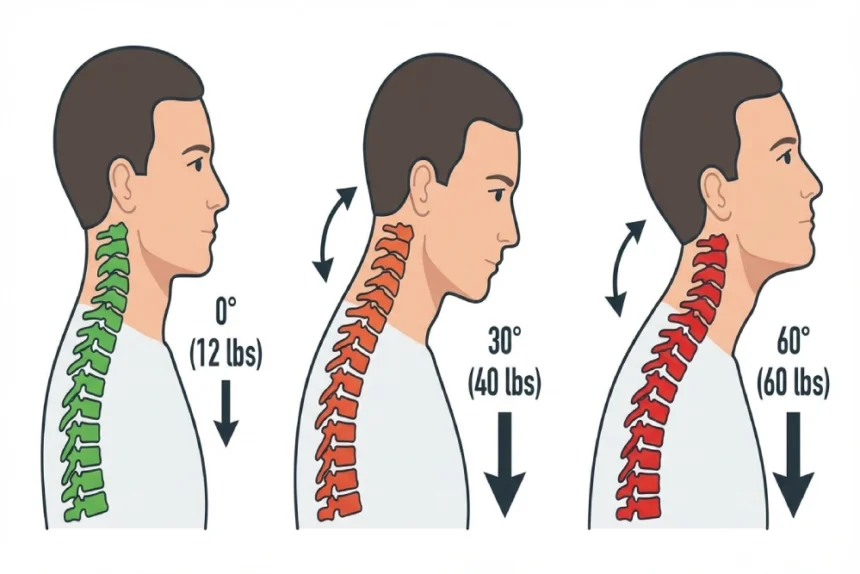
In a neutral position—ears aligned with your shoulders—your head weighs about 10 to 12 pounds. That’s roughly the weight of a bowling ball. Your neck muscles are designed to hold that bowling ball up, but only when it’s balanced.
When you adopt forward head posture to look at a screen, gravity takes over. The pressure on your neck skyrockets:
- 15-degree tilt: The head feels like it weighs 27 pounds.
- 60-degree tilt: It feels like 60 pounds.
Imagine carrying an 8-year-old child around your neck for five hours a day. That is essentially what you’re doing to your spine when you slump.
4 Common Tech Neck Symptoms to Watch For
You might be thinking, “My neck hurts sometimes, but do I actually have tech neck?” It usually starts as a dull ache, but the symptoms can spread.
Here is what to watch for:
- The Nagging Knot: A sharp or dull pain in the neck or upper back. It feels like a “knot” or upper back stiffness you just can’t rub out.
- Morning Stiffness: You wake up feeling like you slept wrong, or it hurts to turn your head side-to-side.
- The Tension Headache: These usually start at the base of your skull and wrap around your forehead like a tight band.
- Pins and Needles: If the muscles get tight enough, they can pinch a nerve. You might feel tingling traveling down your arms into your hands.
Is the Damage Permanent?
This is the big question: Have I ruined my spine forever?
The short answer is: Probably not.
It’s true that years of bad posture can contribute to long-term issues—like disc degeneration or early arthritis. But this doesn’t happen overnight. It’s usually a “perfect storm” of genetics, age, and habits.
For most of us, tech neck is a muscular issue. It hurts, yes, but it’s highly treatable. Surgery is extremely rare and usually only for people with major structural issues. You likely don’t need a surgeon—you just need better habits.
How to Fix Tech Neck: 4 Simple Lifestyle Hacks
You don’t need to throw your phone in the ocean to fix posture pain. You just need to change how you hold your device.
1. Raise the Screen (The Golden Rule)
Stop looking down. This is the single most effective way to prevent tech neck.
- For Phones: Hold your phone up at eye level. Yes, you might look a little silly holding your phone in front of your face. Do it anyway. Your spine will thank you.
- For Laptops: If you work at a desk, use a laptop stand or a stack of thick books to raise the screen to eye level.
2. The “Double Chin” Tuck
Physical therapists love this move because it strengthens the deep neck muscles.
- Sit up straight.
- Pull your chin backward as if you’re trying to make a “double chin.” (Don’t look up or down; just slide your head back).
- Hold for 5 seconds. Repeat 10 times. It looks funny, but it works.
3. The “Doorway Stretch”
When we hunch, our chest muscles tighten up, pulling our shoulders forward permanently.
- Stand in an open doorway.
- Put your forearms on the doorframe.
- Gently lean through until you feel a glorious stretch across your chest.
4. Take Micro-Breaks
Your body hates being a statue. Set a timer. Every 30 minutes, stand up. Roll your shoulders back. Look at the ceiling. Just 60 seconds of movement helps hit the “reset” button on your posture.
When to Call a Doctor
Most of the time, these lifestyle changes will resolve tech neck. But you should see a pro if:
- The pain is severe and rest doesn’t help.
- You have numbness or weakness in your hands (this suggests nerve involvement).
- The pain shoots down your legs.
- You have a stiff neck combined with a fever or headache (this is a medical emergency).
The Bottom Line
Smartphones and laptops are essential tools, but we have to learn to use them without wrecking our bodies.
Think of your posture like a bank account. Every hour you spend hunched over is a withdrawal. Every stretch and posture correction is a deposit. You don’t want to end up in debt with your spinal health.
So, lift that phone up, roll those shoulders back, and give your neck a break. Dealing with tech neck doesn’t have to be your new normal.
FAQs
What are the symptoms of tech neck?
Common symptoms include a dull, aching pain in the lower neck and upper back, reduced mobility or stiffness, and tension headaches. In severe cases, muscle tightness can compress nerves, causing numbness or tingling that radiates down the shoulders into the arms and hands.
How do you prevent tech neck?
The most effective way to prevent tech neck is to raise your device to eye level so you are not looking down. Additionally, take “micro-breaks” every 30 minutes to move your head, stretch your chest muscles to prevent hunching, and practice good ergonomics at your workstation.
Disclaimer: This article is for informational purposes only and isn’t a substitute for professional medical advice. If you’re in pain, always chat with a doctor or physical therapist.